


Alula Security
4.2506.00 Reviews
App Specs
- Version
- Varies with Device
- Updated On
- License
- Free
- Downloads
- 100,000+
- Developer
- Alula, LLC
- Categories
- House & Home
- Platform
- Android
Screenshots
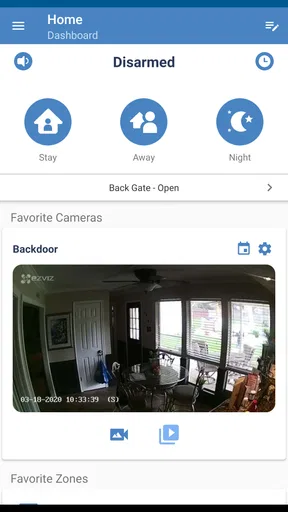
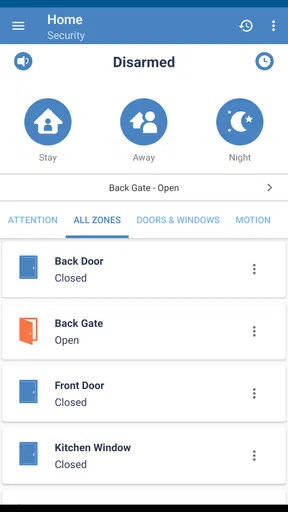
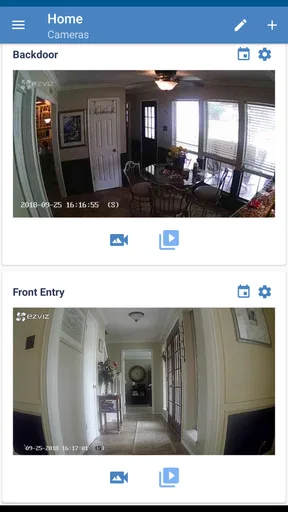
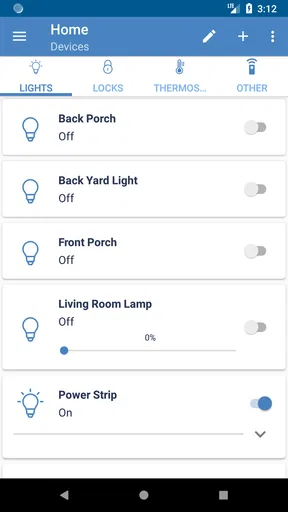
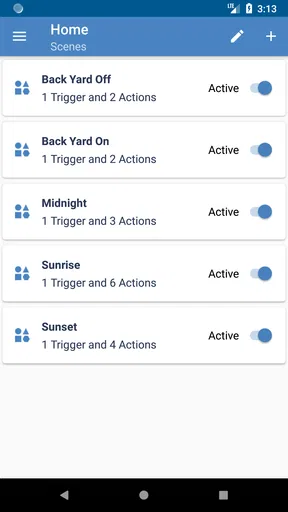
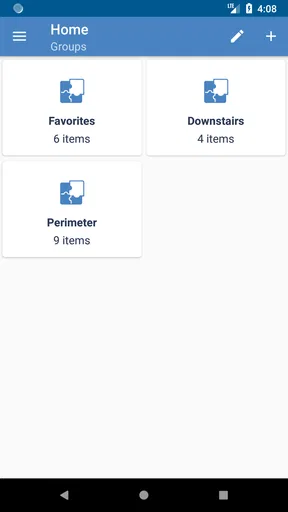
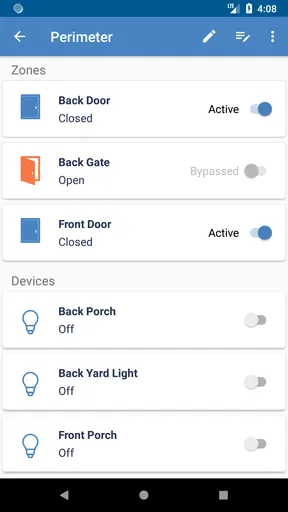
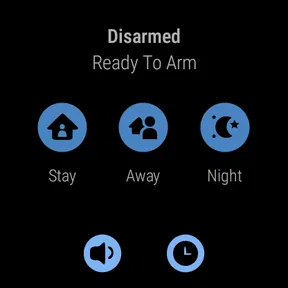
 Analysis by AppCompare
When a home security app is useful, it should make everyday control feel calmer rather than turn the phone into another complicated device to manage. Alula Security takes that practical approach. It is a free House & Home app from Alula, LLC, built around smart control of compatible home automation and security equipment. After spending time with it, my view is fairly clear: it is most appealing to people already using Alula hardware, because its value comes from bringing those connected systems into one mobile experience rather than trying to replace every smart-home tool at once.
I would not choose it simply because it is free or because security apps are popular. I would choose it when the home already belongs to the Alula ecosystem and I want a straightforward way to check and manage it while moving through the day. The app has a 4.2 average from around 3.5 thousand ratings, and more than 100 thousand people have installed it. Those figures suggest a useful level of adoption, but they do not remove the most important question: whether your own security setup is compatible and whether you prefer a focused system over a broad, brand-neutral smart-home platform.
How Alula Security fits into real home routines
I find it helpful to judge Alula Security by the small decisions it can support during an ordinary day, not just by what I might need in an emergency. A useful next step is to decide which household routines should stay simple and which deserve a deliberate check, especially when more than one person uses the system. That distinction leads naturally to the practical question of how mobile access fits alongside the controls already in the home.
A control layer rather than a general smart-home marketplace
The clearest way to understand this app is as a mobile control layer for Alula security and automation. It is not presented as a place to discover unrelated gadgets, compare cameras from many manufacturers, or build a home around a large collection of independent brands. That focus is a strength when you want fewer separate apps. Instead of remembering several interfaces for security-related tasks, you can use one Alula-branded destination for the equipment connected to your home.
That distinction matters when choosing between this and the usual alternatives. Broad smart-home apps can be better for households mixing devices from many manufacturers, especially when lighting, entertainment, thermostats, locks, and security products all need to work together. A manufacturer-specific app can be the better choice when reliability and direct control matter more than universal compatibility. In my experience, Alula Security belongs firmly in the second group. Its usefulness depends less on how many unrelated devices it supports and more on how well it fits the Alula installation you already have.
I also like the fact that the app’s purpose is easy to explain to another household member. A security application should not require a long lesson before someone can understand why it is on the phone. The basic idea is familiar: use the phone as a convenient way to interact with the home’s connected security and automation setup. That makes it easier to imagine in daily life than an app whose appeal depends on endless customization.
The everyday scenario where it makes the most sense
Imagine leaving home in a hurry after locking the door. Rather than treating the app as something you open only during an emergency, you can think of it as part of the departure and arrival routine. A quick check from the phone can help you stay connected to the security system while you are away, and the same mobile access can be useful when you return and want to manage the home without going directly to a fixed control panel.
Worth Reading Before You Choose

EA SPORTS FC Mobile 26 Is a Bigger Football Game, but It Takes Time

Flipboard Shows What News Apps Must Do Beyond the Feed

Switching to Android Auto Means Rethinking Your Driving Routine

Google Calendar Makes a Crowded Week Easier to Manage

Ludo King Makes the Most of the Minutes Between Plans

Baby Panda World Brings Quick Play to Modern Phones, but Its Game Library Feels Busy
The important benefit here is not novelty. It is reducing dependence on one physical location in the house. A phone is already with you when you are moving between rooms, leaving for work, or checking on the property from elsewhere. That convenience can be meaningful for people who often wonder whether the home was secured correctly or who want a more flexible relationship with their installed system.
There is also a useful household angle. A dedicated security app can make responsibilities easier to share than a wall-mounted panel that only one person remembers to use. If several people in the home need access, the practical experience will depend on how the Alula system has been configured and what account arrangements are available to them. I would set expectations carefully here: the app is a control tool, not a substitute for deciding who should have access, what each person is allowed to do, and how the family will respond to alerts or unusual activity.
What I found most valuable beyond the short description
The first less-obvious strength is the app’s role in reducing interface switching. A home with security and automation equipment can become frustrating when every function lives in a different application. Even if each individual app is acceptable, the combined routine becomes easy to forget. Keeping the Alula-related controls together gives the phone a more coherent purpose and can make regular checks feel less like technical maintenance.
The second insight is that a security app should be judged by the moments between major events, not only by dramatic emergency scenarios. Most days are ordinary. You may want reassurance after leaving, a convenient way to interact with the system while carrying groceries, or a simple mobile complement to the installed controls. Alula Security is better suited to those repeated, low-drama interactions than to users looking for a complete security command center packed with broad monitoring tools.
The third trade-off is connected to brand commitment. A focused app can feel cleaner because it does not need to explain every possible third-party device. At the same time, that focus becomes a limitation if your home changes direction. Someone who enjoys replacing devices frequently or combining products from several ecosystems may find a neutral smart-home platform more flexible. The app’s simplicity is therefore not universally better; it is better when your equipment choices are already relatively settled.
Setup expectations and the importance of the existing system
I would approach installation with the understanding that downloading the app is only one part of the experience. The useful controls come from the connected Alula security and automation arrangement in the home. If you are shopping for a new system, the app should be considered alongside the hardware, account setup, and installation process rather than evaluated as an independent utility.
This is also why I would not recommend installing it first and assuming it will transform an unrelated security setup. The app is not a universal remote for every alarm, sensor, camera, or smart-home product. Before committing to it, check that the equipment in your home is part of the Alula environment and that you have the credentials or access instructions needed to use the mobile service. That small bit of preparation can prevent the common disappointment of expecting a standalone app to provide functions that actually depend on a compatible installation.
On the positive side, the focused design makes the intended use easier to understand. You are not being asked to build an entire smart home from scratch inside a crowded catalog. You are connecting your phone to a specific security and automation experience. For a homeowner who values a defined system, that can be more comfortable than assembling a collection of unrelated products and hoping their apps cooperate.
The meaningful weakness: convenience still depends on the ecosystem
The biggest weakness is not a minor interface annoyance; it is the app’s dependence on the Alula setup around it. If the home contains equipment from several brands, Alula Security may become only one more app rather than the single place you hoped to use. That can undermine the main convenience. A household that wants one universal dashboard may be happier with a platform designed around cross-brand compatibility, even if that platform feels more complicated.
There is another practical limitation in the nature of mobile security control. A phone makes access more convenient, but it also adds another point in the routine that must be kept ready: the device needs to be available, the account needs to be usable, and the user needs to understand the consequences of each action. I would not treat the app as a replacement for sensible physical security habits or for learning the controls on the installed system. The phone is a useful layer, not the entire safety plan.
I also think users should be realistic about what “smart control” means in their own home. The experience will vary according to the equipment and configuration connected to the account. One person may mainly use it for security tasks, while another may see more value from the automation side. That flexibility is helpful, but it means the app cannot be judged properly from the download screen alone. Its strongest features are tied to the system it is managing.
For me, that makes the app less suitable for casual experimentation. If you simply want to try a smart-home app without owning compatible Alula equipment, there is little reason to make this your first choice. A broad platform with support for devices you already own would be a more sensible starting point. Alula Security earns its place when it is attached to the right home, not when it is treated as a generic security download.
Who should use it, and who should look elsewhere?
I would recommend it first to homeowners or residents with an Alula security and automation installation who want mobile access in addition to the controls already in the property. It is also a reasonable fit for people who prefer a dedicated manufacturer experience over a sprawling app that tries to manage every kind of connected device. If your priority is keeping security-related control in one recognizable place, the focused approach is appealing.
It may also suit households where convenience matters during transitions: leaving for work, arriving home, checking the property while traveling, or sharing responsibility for routine security tasks. The app is most valuable when it becomes part of a repeated habit rather than an application opened once and forgotten. I would spend a little time deciding which actions belong in the daily routine before relying on it. A simple, consistent habit is more useful than installing an app and leaving every control unexplored.
I would steer away from it if you expect a universal smart-home controller, want to mix many unrelated brands, or are searching for a security service that works independently of installed equipment. In those cases, a cross-platform alternative may be the better match. You may sacrifice some of the directness of a brand-specific app, but gain a wider range of devices and a more flexible long-term setup.
It is also worth remembering that this is an Everyone-rated app, so its presentation is intended for a broad audience rather than a specialist technical audience. That is welcome for family use, but it does not mean every security decision is automatically simple. New users should still learn the system’s routines and make sure everyone with access understands what they are doing. The app can make control easier; it cannot make unclear household rules clear by itself.
Compatibility, cost, and phone requirements
The app is free to download, which lowers the barrier to trying it when you already have the matching Alula environment. I see that as a practical advantage, especially for existing customers who want mobile control without paying separately just to install the companion application. Still, “free” should not be confused with a complete standalone security service. The overall home setup, equipment, and any arrangements connected to it remain the more important part of the decision.
On Android, it requires Android 8.0 or later. That is useful to know before planning a household rollout, particularly if someone will use an older spare phone as the control device. I would check the operating system on every phone that needs access rather than assuming one successful installation means all household devices will work. The app was released on March 13, 2018, but the practical question for a new user is whether the current phone and the existing Alula system fit together properly.
The app has received around 506 written reviews in addition to its rating activity, giving prospective users more than a single headline score to consider. I would read recent user comments with a specific purpose: look for experiences involving your type of Alula installation, the phone models used in your household, and the routines you care about most. Security software is especially sensitive to differences in system configuration, so a comment from a similar setup is more useful than a general complaint or compliment.
My final view after weighing the trade-offs
Alula Security is a focused companion for people who want their Alula home security and automation controls available on a phone. Its strongest argument is practical: it can make an existing Alula setup easier to reach during ordinary moments, without forcing the user into a giant, brand-neutral smart-home interface. I appreciate that clear purpose, and I can see why it has attracted a substantial installed base.
My reservation is equally clear. The app is not the right answer for every smart home, and its usefulness falls sharply when the household expects broad compatibility or has no compatible Alula equipment. The mobile convenience also works best when users understand their system, establish sensible access habits, and treat the app as one part of home security rather than the whole solution.
My recommendation is conditional but positive: if your home already uses Alula equipment and you want free mobile control on a compatible Android phone, this is a sensible app to try. If you are still choosing an ecosystem, compare the hardware and long-term compatibility first. In my view, the app succeeds not by being everything for everyone, but by being a focused bridge between an Alula installation and the daily life of the people using it.
Pros
- Simple interface makes core security tools easy to find.
- Helps monitor device activity from one central dashboard.
- Useful alerts can draw attention to unusual security events.
- Lightweight design should be manageable on many Android devices.
- Can support safer habits by keeping security information visible.
Cons
- Some features may require a compatible device or supported service.
- Security alerts may become distracting if notifications are frequent.
- Advanced protection options can feel limited for experienced users.
- Performance and coverage may vary by device and operating system.
- The app should not replace careful browsing or strong account passwords.
FAQs for Alula Security
What is Alula Security and what does it do?
Alula Security is a mobile companion for compatible Alula home security systems. After connecting it to a supported account and installed equipment, users can typically check system status, arm or disarm security modes, receive event notifications, and interact with connected devices such as sensors, cameras, locks, or automation products. Its exact features depend on the Alula equipment and services activated at the property.
Is Alula Security compatible with every security system or phone?
No. Alula Security is designed to work with compatible Alula security platforms, communication modules, and professionally configured services rather than with every alarm panel on the market. Before downloading, confirm that your monitoring provider supports the app and that your device meets the current Android or iOS requirements. Some functions may also vary according to the hardware installed in your home or business.
Can I arm or disarm my alarm remotely with Alula Security?
In supported installations, the app allows authorized users to manage alarm states remotely, including arming selected modes and possibly disarming the system. This convenience is useful when leaving home, checking a property, or allowing access to someone else. Remote control depends on your account permissions, system configuration, communication connection, and monitoring service, so not every user will see identical controls.
Does Alula Security send notifications about alarms and other events?
Alula Security can provide mobile alerts for supported events, such as alarm activity, sensor changes, system status updates, or other configured notifications. To receive them reliably, notifications must be enabled both in the app and in your phone’s operating-system settings. Delivery can still be affected by internet access, battery-saving restrictions, device permissions, and the communication connection used by the security system.
Is Alula Security free to use, and is professional monitoring included?
Downloading the Alula Security app may be free, but access to its controls normally requires a compatible Alula system, an activated user account, and services supplied by an installer or monitoring company. Professional monitoring, cellular communication, camera storage, automation features, or other premium functions may involve separate fees. Review your provider’s contract and service plan before relying on the app for protection.


